WinUI 3 Exception Handling: Building Robust Desktop Applications
Introduction
Any application is bound to encounter exceptions—network disconnections, missing files, null references, out-of-memory conditions... The key is how to handle these exceptions gracefully rather than letting the application crash directly.
As a next-generation Windows desktop application framework, WinUI 3 provides a multi-level exception handling mechanism. This article will detail common exception handling approaches in WinUI 3 to help you build more robust applications.
1. Exception Handling Hierarchy
Exceptions in WinUI 3 applications can be caught at different levels:
App Layer (UnhandledException)              ← Outermost layer, fallback

Page/Window Layer (try-catch)               ← UI layer

ViewModel/Service Layer                     ← Business logic layer

async/Task Exceptions (TaskScheduler.UnobservedTaskException) ← Async tasks
Due to space constraints, this article covers the most basic and commonly used exception handling methods.
2. Application.Current.UnhandledException
This is the most critical global exception handling entry point in WinUI 3 applications. Any uncaught exception will eventually reach here.
Basic Usage
In App.xaml.cs:
public partial class App : Application {
    public App()    {
        this.InitializeComponent();
        // Subscribe to global unhandled exception event
        this.UnhandledException += OnAppUnhandledException;
    }

    private void OnAppUnhandledException(object sender, Microsoft.UI.Xaml.UnhandledExceptionEventArgs e)  {
        // Mark exception as handled to prevent application crash
        e.Handled = true;

        // Log exception information
        LogException(e.Exception, "UnhandledException");

        // Show friendly error prompt
        ShowErrorDialog("The application encountered an issue and has attempted to recover.");
    }
}
Key Points
| Property/Method | Description |
|---|---|
e.Exception |
Gets the exception object, containing stack trace and other information |
e.Handled = true |
Marks the exception as handled; the application will not crash |
e.Handled = false |
Marks the exception as unhandled; the application will terminate |
⚠️ Important Note
UnhandledException can only catch exceptions on the UI thread! Exceptions in background threads and async tasks require other handling methods.
3. TaskScheduler.UnobservedTaskException
Handles unobserved exceptions in async/await tasks. Triggered when a Task is garbage collected and an exception remains unobserved.
Usage
    this.InitializeComponent();
    this.UnhandledException += OnAppUnhandledException;
    // Subscribe to unobserved task exceptions
    TaskScheduler.UnobservedTaskException += OnTaskUnobservedException;
}

private void OnTaskUnobservedException(object sender, UnobservedTaskExceptionEventArgs e) {
    e.SetObserved();  // Mark exception as observed
    LogException(e.Exception, "UnobservedTaskException");
    // Optionally show a prompt or log the error
}
Practical Example
async Task DangerousMethod() {
    await Task.Run(() => {
        throw new InvalidOperationException("Background operation failed");
    });
}
// Call without awaiting or handling
_ = DangerousMethod();  // Exception may be ignored
Best Practice
Always wrap async operations with try-catch, or use await + try-catch to properly handle exceptions.
4. Scenario-Specific Exception Handling
File I/O Operations
    try {
        var file = await StorageFile.GetFileFromPathAsync(filePath);
        var content = await FileIO.ReadTextAsync(file);
        // Process file content...
    }
    catch (FileNotFoundException ex) {
        await ShowErrorDialog($"File not found: {filePath}");
        LogException(ex, "FileNotFound");
    }
    catch (UnauthorizedAccessException ex) {
        await ShowErrorDialog("No permission to access the file");
        LogException(ex, "UnauthorizedAccess");
    }
    catch (Exception ex) {
        await ShowErrorDialog($"Failed to read file: {ex.Message}");
        LogException(ex, "FileIOError");
    }
}
Network Request Exceptions
    try {
        using var client = new HttpClient();
        client.Timeout = TimeSpan.FromSeconds(30);
        return await client.GetAsync(url);
    }
    catch (HttpRequestException ex) {
        LogException(ex, "NetworkError");
        throw new NetworkException("Network connection failed, please check your network settings", ex);
    }
    catch (TaskCanceledException ex) {
        LogException(ex, "RequestTimeout");
        throw new TimeoutException("Request timeout, please try again later", ex);
    }
}
5. Exception Handling Practices in Xiaoye Remote
In actual development, exception handling is not only about preventing crashes but also about helping developers quickly locate issues.
One-Click Feedback
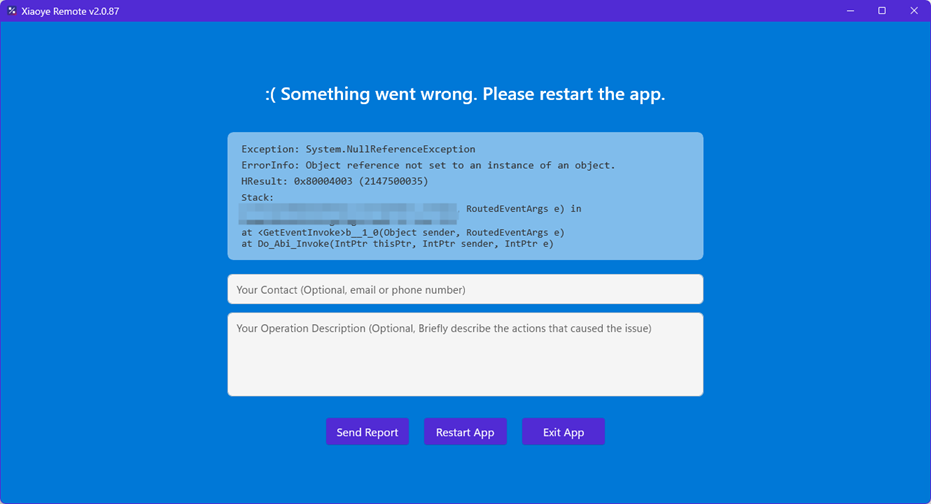
In Xiaoye Remote, we have designed a convenient exception feedback mechanism:
If you encounter an exception while using Xiaoye Remote, simply click the one-click feedback button on the exception interface to report the error information to us. The error information does not contain any personal data.
Feature Highlights
| Feature | Description |
|---|---|
| 🔒 Data Security | Only collects exception stack traces and system environment information, contains no user data |
| ⚡ One-Click Operation | No forms to fill out, feedback can be submitted with a single click |
| 🔄 Real-Time Notification | Developers can receive exception reports promptly and fix them |
6. Best Practices Summary
✅ DO (Recommended Practices)
-
Always set up
UnhandledExceptionas the outermost fallback -
Log detailed exception information (type, stack trace, time, context)
-
Provide user-friendly prompts, avoid showing overly technical log details
-
Handle specific exceptions at appropriate layers (e.g., network, file operations)
-
Provide exception feedback channels to allow users to help improve the application
❌ DON'T (Practices to Avoid)
-
Don't swallow exceptions without logging them (
e.Handled = truewithout any action) -
Don't perform long-running operations on the UI thread (use async/await)
-
Don't ignore Task exceptions (use try-catch or await)
-
Don't throw the same exception in a catch block (loses stack trace information)
-
Don't display complete exception stack traces to users in production
Conclusion
Exception handling is an indispensable foundation in desktop application development. WinUI 3 provides a comprehensive exception handling mechanism. Properly utilizing these mechanisms can make your applications more robust and your users more satisfied.
Remember: Good exception handling doesn't mean the application never reports errors—it means when errors occur, the application can degrade gracefully, log the issue, and help users recover their operations.
If you encounter any issues while using Xiaoye Remote, please feel free to report them to us through the one-click feedback feature on the exception interface, helping us make the product better!