WFP: The "Universal Power Strip" for Windows Network Filtering
If you're doing Windows network development—especially firewalls, VPNs, network monitoring, or similar tools—WFP (Windows Filtering Platform) is unavoidable. However, terms like drivers, kernel, and Callouts can be intimidating.
This article won't dive into complex API details. Instead, it aims to explain, in the simplest terms possible, what WFP is, what it can do, and how it works internally.
What Exactly is WFP?
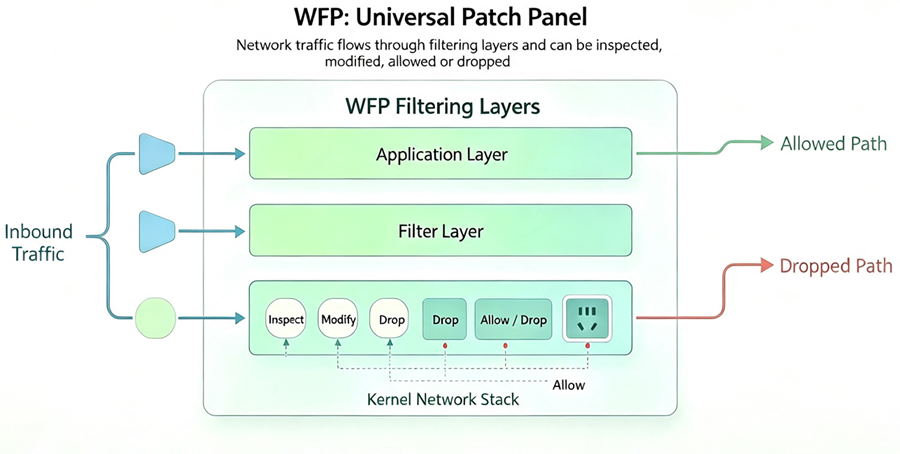
In one sentence: WFP is a "universal power strip" embedded in the Windows kernel network stack.
It provides "sockets" (filtering layers) at all key points where network data passes through. You can plug your own processing logic ("plugs") into these sockets to intercept, inspect, modify, and allow/block network traffic.
The built-in Windows Firewall itself is Microsoft's own "plug" inserted into these sockets. Antivirus software, parental controls, and traffic monitoring tools all leverage this same infrastructure.
Why Use WFP?
Before WFP, developers had several legacy approaches for network filtering: TDI filters, NDIS intermediate drivers, Winsock LSPs, and others. Each had its own limitations:
-
Some could only intercept traffic at specific points, without end-to-end control.
-
Some lacked compatibility with newer protocols like IPv6.
-
Some frequently broke with OS updates.
WFP's greatest value is unifying and standardizing network filtering on Windows. Starting with Windows Vista/Server 2008, it became the foundation for modern firewall and network processing solutions.
The "Big Four" Components of WFP
The WFP architecture can be understood as four roles working together:
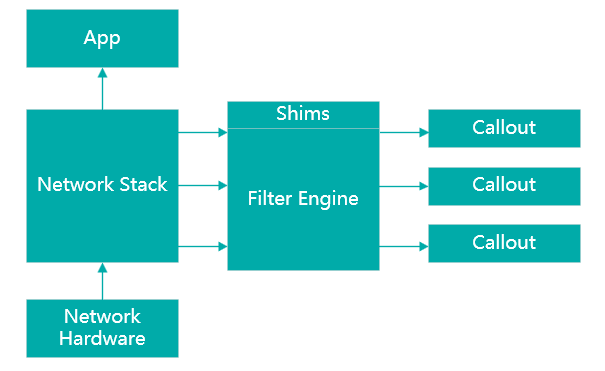
1. Shims: The "On-site Intelligence Officers"
These are kernel-mode modules embedded at various layers of the TCP/IP stack. They intercept passing traffic, package it into a format WFP understands, and forward it to the filter engine for classification.
Different shims handle traffic at different layers—ALE shims handle application connections, transport-layer shims handle transport data, network-layer shims handle network packets, and so on. You don't need to write shims yourself; they're built into the WFP framework.
2. Filter Engine: The Core "Referee"
This is the heart that does the actual work. It spans both kernel-mode and user-mode, with approximately 50 kernel-mode layers and 10 user-mode layers. Data passes through different layers at different stages of its journey through the network stack.
Each layer contains sub-layers and filters. A filter is essentially a rule, such as "allow traffic if the destination port is 80." When traffic arrives, the filter engine evaluates rules in priority order and renders a verdict: "allow" or "block."
3. Base Filtering Engine (BFE): The Behind-the-Scenes "Dispatcher"
BFE is a user-mode system service (the Base Filtering Engine) and serves as the management and control center for WFP.
Its primary responsibilities include:
-
Accepting commands from上层 applications (like firewall management UIs) to add or remove filters.
-
Arbitrating policies from multiple sources when conflicts arise.
-
Maintaining WFP's operational state and statistics.
-
Distributing IPsec and other policy configurations to the appropriate system modules.
In short, BFE issues the commands, and the filter engine executes them.
4. Callouts: The "Custom Hooks" for Developers
This is where WFP's extensibility shines. The built-in "allow/block" logic not flexible enough? You can write your own Callout Driver to register one or more callback functions (Callouts).
You can attach a Callout to any kernel-mode layer. When a packet matches a filter that uses your Callout, your classifyFn function is invoked. Inside it, you can implement advanced logic such as:
-
Deep Packet Inspection: Scan packet payloads for malware signatures.
-
Packet Modification: Perform NAT, rewriting IP addresses and ports.
-
Stream Modification: Replace or remove sensitive words in data streams (e.g., parental controls).
-
Logging: Record all blocked or matched traffic.
With Callouts, WFP transforms from a simple "switch" into a deeply programmable network processing platform.
How is WFP Layered?
WFP's layers correspond directly to the TCP/IP protocol stack, with filtering points available from application-layer data all the way down to raw packets leaving the NIC. Here's a brief walkthrough using an outbound TCP packet as an example:
-
Application Layer (ALE Layer): The app calls
send(), and the data enters the kernel. TheALE_AUTH_CONNECTlayer is triggered—this is the "connection authorization" stage, where you can obtain process PID, image path, destination IP/port, and other info. This is the most critical layer for building application-aware firewalls. -
Transport Layer (TRANSPORT Layer): The TCP packet has been constructed but not yet fragmented. At
OUTBOUND_TRANSPORT_V4, you can access the complete TCP header and payload data. -
Network Layer (IPPACKET Layer): The IP packet has been encapsulated and may be fragmented. At
OUTBOUND_IPPACKET_V4, you can access the IP header. Process information is no longer available at this layer, making it suitable for IP-level filtering and VPN tunnel encapsulation.
For inbound traffic, the order is reversed: INBOUND_IPPACKET_V4 → INBOUND_TRANSPORT_V4 → ALE_AUTH_RECV_ACCEPT, flowing upward.
How to Choose the Right Layer?
Different development goals require different layers. The following table summarizes common use cases and their recommended layers:
| What You Want to Do | Recommended Layer | Reason |
|---|---|---|
| Block a specific application from accessing the network; per-process control | ALE_AUTH_CONNECT / ALE_AUTH_RECV_ACCEPT |
Provides full process information and only processes the first packet of a connection, offering good performance. |
| Analyze HTTP requests; detect SQL injection | STREAM layer (TCP-specific) |
Data is reassembled from TCP segments, providing a continuous application-layer data stream for easy parsing. |
| Analyze DNS packets (UDP) | DATAGRAM layer (UDP-specific) |
Provides the complete UDP datagram, ideal for DNS filtering. |
| IP-level firewall; VPN tunnels | IPPACKET layer |
Offers the lowest-level interception, though it sacrifices process and port information. |
Summary
WFP is the "right path" for network filtering on Windows. It exposes critical points in the network stack, allowing you to intercept and process traffic in a standardized way.
While writing a Callout driver still requires working through the WDK documentation, understanding WFP's "power strip" model makes the core concepts clear: data travels through the stack, passes through a series of "sockets" (layers), and your "plugs" (Callouts) execute logic there, telling the system whether to allow, block, or modify each packet.