DNS Interception and Custom IP Redirection Using WFP
When developing Windows networking solutions, there are times when you need to intercept DNS queries for a specific domain and return a custom IP address to achieve traffic steering, local debugging, or access control.
This article uses the interception of DNS A-record queries for www.abc.com as an example to walk through how to intercept DNS requests at the transport layer via WFP (Windows Filtering Platform) and return a specified IP address (e.g., 192.168.1.100). The focus is on the configuration flow and key decision points, supplemented by essential code snippets.
Overall Flow
The entire solution consists of five steps:
-
Register a Provider and SubLayer to establish your own "territory"
-
Register a Callout and bind callback functions
-
Add a filter to capture only UDP traffic on port 53
-
In the callback, parse the DNS request, match the target domain, construct a response, and inject it
-
On unload, clean up all resources in reverse order
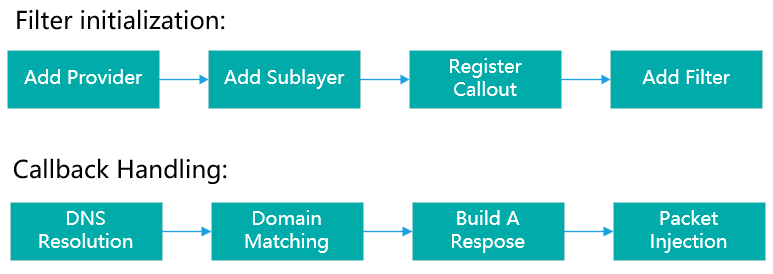
Step 1: Create Provider and SubLayer
A Provider identifies who registered the rules, while a SubLayer manages priority ordering for filters under the same Provider. Both are prerequisites for registering Filters and Callouts.
When creating a SubLayer, the weight value directly determines the evaluation priority of our filters within the same layer. Setting it to a high value like 0x7FFF ensures that our filter rules are evaluated before system default rules, preventing preemption by Windows Firewall or other third-party software.
Two APIs are called for this step: FwpmProviderAdd and FwpmSubLayerAdd.
Step 2: Register Callout
A Callout is the "hook" that WFP provides for developers to inject custom logic.
Two things need to be done here:
-
Kernel Registration (
FwpsCalloutRegister): Binds theclassifyFn,notifyFn, andflowDeleteFncallbacks to the Callout.classifyFnis the core handler invoked for every matching packet;notifyFnhandles Callout lifecycle events;flowDeleteFncleans up flow context. -
Management Registration (
FwpmCalloutAdd): Registers this Callout with the filtering engine's management layer and specifies the layer it attaches to. We chooseFWPM_LAYER_OUTBOUND_TRANSPORT_V4.
Why the transport layer instead of the network layer? The network layer (IPPACKET) also exposes UDP ports, but it presents complete IP packets that may be fragmented, requiring the developer to handle reassembly themselves. The transport layer, by contrast, delivers already-reassembled UDP datagrams and can associate them with process information, offering richer filtering conditions and simpler implementation.
Step 3: Add Filter Conditions
After registration, the Callout does not take effect automatically—it must be activated by adding a Filter.
A Filter consists of a set of Conditions and an Action. We need two conditions:
-
Protocol must be UDP (
FWPM_CONDITION_IP_PROTOCOL == IPPROTO_UDP) -
Destination port must be 53 (
FWPM_CONDITION_IP_REMOTE_PORT == 53)
The action is set to FWP_ACTION_CALLOUT_TERMINATING, meaning: once both conditions match, terminate subsequent filter processing immediately and hand the packet over to our Callout. This ensures both performance and avoids conflicts with other filters.
This step calls FwpmFilterAdd.
Step 4: Prepare Injection Resources
The forged DNS response must be re-injected back into the network stack, which requires two infrastructure components:
-
NET_BUFFER_LIST Pool (
NdisAllocateNetBufferListPool): Used to allocate memory structures that hold the forged packet. Pool-based allocation is more efficient than allocating from scratch every time, which is critical for performance-sensitive network processing. -
Injection Handle (
FwpsInjectionHandleCreate): Creates a transport-layer injection handle. We chooseFWPS_INJECTION_TYPE_TRANSPORTbecause our forged packet is a constructed UDP datagram that needs to be injected from the transport layer. This handle is used when callingFwpsInjectTransportReceiveAsyncfor asynchronous injection.
Both resources are prepared once during initialization to avoid repeated creation overhead per injection.
Step 5: What Happens Inside the Callback
Once a DNS request hits the filter conditions, the classifyFn callback is invoked. Its function prototype is:
typedef void (NTAPI *FWPS_CALLOUT_CLASSIFY_FN2)(
    _In_ const FWPS_INCOMING_VALUES0* nFixedValues,
    _In_ const FWPS_INCOMING_METADATA_VALUES0* inMetaValues,
    _Inout_opt_ void* layerData,
    _In_opt_ const void* classifyContext,
    _In_ const FWPS_FILTER2* filter,
    _In_ UINT64 flowContext,
    _Inout_ FWPS_CLASSIFY_OUT0* classifyOut
);
The processing flow is as follows:
5.1 Extract Packet Information
Retrieve remote address, local address, ports, interface index, and other fields from inFixedValues. For the OUTBOUND_TRANSPORT_V4 layer, available fields include:
-
FWPS_FIELD_OUTBOUND_TRANSPORT_V4_IP_REMOTE_ADDRESS: Destination IP -
FWPS_FIELD_OUTBOUND_TRANSPORT_V4_IP_LOCAL_ADDRESS: Source IP -
FWPS_FIELD_OUTBOUND_TRANSPORT_V4_IP_REMOTE_PORT: Destination port -
FWPS_FIELD_OUTBOUND_TRANSPORT_V4_IP_LOCAL_PORT: Source port -
FWPS_FIELD_OUTBOUND_TRANSPORT_V4_INTERFACE_INDEX: Network interface index
These are needed when constructing the response packet—particularly the interface index, which determines the NIC through which the packet is injected.
5.2 Extract and Parse the DNS Request
Inside the classifyFn callback, layerData points to a NET_BUFFER_LIST structure. Using NdisGetDataBuffer, we extract the complete UDP datagram:
-
UDP header is fixed at 8 bytes (source port 2 bytes + destination port 2 bytes + length 2 bytes + checksum 2 bytes)
-
The UDP header is immediately followed by the DNS message
DNS Query Format (QR=0) – www.abc.com A-record query:
                                    1  1  1  1  1  1
      0  1  2  3  4  5  6  7  8  9  0  1  2  3  4  5
    +--+--+--+--+--+--+--+--+--+--+--+--+--+--+--+--+
    |                      ID                     |   Transaction ID (matches response)
    +--+--+--+--+--+--+--+--+--+--+--+--+--+--+--+--+
    |QR|   Opcode  |AA|TC|RD|RA| Z|AD|CD| RCODE   |   QR=0 indicates query
    +--+--+--+--+--+--+--+--+--+--+--+--+--+--+--+--+
    |                    QDCOUNT                    |   Question section count (=1)
    +--+--+--+--+--+--+--+--+--+--+--+--+--+--+--+--+
    |                    ANCOUNT                    |   Answer section count (=0)
    +--+--+--+--+--+--+--+--+--+--+--+--+--+--+--+--+
    |                    NSCOUNT                    |   Authority section count (=0)
    +--+--+--+--+--+--+--+--+--+--+--+--+--+--+--+--+
    |                    ARCOUNT                    |   Additional section count (=0)
    +--+--+--+--+--+--+--+--+--+--+--+--+--+--+--+--+
    |                                               |
    /                     QNAME                     /   Domain name (www.abc.com)
    /                                               /
    +--+--+--+--+--+--+--+--+--+--+--+--+--+--+--+--+
    |                    QTYPE                      |   Query type (A=1)
    +--+--+--+--+--+--+--+--+--+--+--+--+--+--+--+--+
    |                    QCLASS                     |   Query class (IN=1)
    +--+--+--+--+--+--+--+--+--+--+--+--+--+--+--+--+
The QNAME field is encoded with each label prefixed by a length byte, followed by the label content, and terminated by 0x00. For example, www.abc.com is encoded as:
03 77 77 77 03 61 62 63 03 63 6f 6d 00
3  w  w  w  3  a  b  c  3  c  o  m end
First, check the QR bit in the DNS header (the high bit of the third byte)—if it is 1, this is a DNS response, so skip it; only queries with QR=0 need to be processed.
Then parse the Question section to extract the queried domain name. For a domain like www.abc.com, use RuleManagerMatch to determine whether it matches the rule list.
5.3 Check Query Type and Construct Response
Extract the QTYPE (query type) from the end of the Question section to determine whether it is an A-record (IPv4, QTYPE=1) or AAAA-record (IPv6, QTYPE=28).
Upon receiving an A-record query, construct a response containing 192.168.1.100. The response is based on the original request with the following modifications:
DNS Header Modifications:
| Field | Original | New | Description |
|---|---|---|---|
| QR | 0 | 1 | Change to response |
| Opcode | 0 | 0 | Unchanged |
| AA | 0 | 1 | Set as authoritative answer |
| RCODE | 0 | 0 | No error |
| QDCOUNT | 1 | 1 | Retain original query |
| ANCOUNT | 0 | 1 | Add 1 answer record |
DNS Response Format (QR=1) – www.abc.com -> 192.168.1.100:
                                    1  1  1  1  1  1
      0  1  2  3  4  5  6  7  8  9  0  1  2  3  4  5
    +--+--+--+--+--+--+--+--+--+--+--+--+--+--+--+--+
    |                      ID                     |   Same transaction ID as request
    +--+--+--+--+--+--+--+--+--+--+--+--+--+--+--+--+
    |QR|   Opcode  |AA|TC|RD|RA| Z|AD|CD| RCODE   |   QR=1, AA=1
    +--+--+--+--+--+--+--+--+--+--+--+--+--+--+--+--+
    |                    QDCOUNT                    |   Question count (=1)
    +--+--+--+--+--+--+--+--+--+--+--+--+--+--+--+--+
    |                    ANCOUNT                    |   Answer count (=1)
    +--+--+--+--+--+--+--+--+--+--+--+--+--+--+--+--+
    |                    NSCOUNT                    |   Authority count (=0)
    +--+--+--+--+--+--+--+--+--+--+--+--+--+--+--+--+
    |                    ARCOUNT                    |   Additional count (=0)
    +--+--+--+--+--+--+--+--+--+--+--+--+--+--+--+--+
    |                                               |
    /                     QNAME                     /   Echo back the query domain
    /                                               /
    +--+--+--+--+--+--+--+--+--+--+--+--+--+--+--+--+
    |                    QTYPE                      |   Echo back (A=1)
    +--+--+--+--+--+--+--+--+--+--+--+--+--+--+--+--+
    |                    QCLASS                     |   Echo back (IN=1)
    +--+--+--+--+--+--+--+--+--+--+--+--+--+--+--+--+
    |                                               |
    /                     NAME                      /   Answer section: echo domain
    /                                               /
    +--+--+--+--+--+--+--+--+--+--+--+--+--+--+--+--+
    |                    TYPE                       |   Type (A=1)
    +--+--+--+--+--+--+--+--+--+--+--+--+--+--+--+--+
    |                    CLASS                      |   Class (IN=1)
    +--+--+--+--+--+--+--+--+--+--+--+--+--+--+--+--+
    |                    TTL                        |   Time-to-live (e.g., 300s)
    +--+--+--+--+--+--+--+--+--+--+--+--+--+--+--+--+
    |                    RDLENGTH                   |   Data length (IPv4=4)
    +--+--+--+--+--+--+--+--+--+--+--+--+--+--+--+--+
    |                    RDATA                      |   192.168.1.100 (4 bytes)
    +--+--+--+--+--+--+--+--+--+--+--+--+--+--+--+--+
The RDATA field holds the IP address. 192.168.1.100 in network byte order (big-endian) is written as C0 A8 01 64.
When constructing the response, you need to modify the DNS header of the original request: flip the QR bit, set response flags, and populate the Answer section. The UDP header must also be prepended before the data because the injection occurs from the transport layer.
5.4 Encapsulate IP Header and Inject
The constructed DNS response also needs a UDP header prepended before it can be injected from the transport layer:
UDP Header (8 bytes):
    +--+--+--+--+--+--+--+--+--+--+--+--+--+--+--+--+
    |            Source Port (DNS server=53)        |
    +--+--+--+--+--+--+--+--+--+--+--+--+--+--+--+--+
    |            Destination Port (client port)     |
    +--+--+--+--+--+--+--+--+--+--+--+--+--+--+--+--+
    |              UDP Length                       |
    +--+--+--+--+--+--+--+--+--+--+--+--+--+--+--+--+
    |             UDP Checksum                      |
    +--+--+--+--+--+--+--+--+--+--+--+--+--+--+--+--+

    +--+--+--+--+--+--+--+--+--+--+--+--+--+--+--+--+
    |              DNS Response (above)             |
    +--+--+--+--+--+--+--+--+--+--+--+--+--+--+--+--+
Then, use FwpsConstructIpHeaderForTransportPacket0 to encapsulate the IP header in front of the NBL:
status = FwpsConstructIpHeaderForTransportPacket0(
    pInjectNbl,          // NBL containing UDP+DNS data
    0,                   // headerIncludeHeaderLength
    AF_INET,             // IPv4
    (UCHAR*)&srcIp,      // Source IP (DNS server address)
    (UCHAR*)&dstIp,      // Destination IP (client address)
    IPPROTO_UDP,         // Protocol type
    0,                   // endpointHandle
    NULL,                // controlData
    0,                   // controlDataLength
    0,                   // flags
    NULL,                // reserved
    interfaceIndex,      // Network interface index
    subInterfaceIndex    // Sub-interface index
);
After encapsulation, call FwpsInjectTransportReceiveAsync for asynchronous injection. The completion callback is responsible for freeing the NBL and the previously allocated DNS response data memory.
5.5 Block the Original Packet
This final step is critical: you must set classifyOut->actionType = FWP_ACTION_BLOCK and set the FWPS_CLASSIFY_OUT_FLAG_ABSORB flag.
If the original packet is not blocked, the real DNS response will arrive later and conflict with the forged packet, causing the application to receive the wrong IP. With these flags set, WFP discards the original request, and only the forged response reaches the application layer.
Step 6: Cleanup
When unloading the driver, the resource release order must strictly reverse the initialization order:
-
Delete Filter (
FwpmFilterDeleteById) -
Delete user-mode Callout (
FwpmCalloutDeleteByKey) -
Unregister kernel Callout (
FwpsCalloutUnregisterByKey) -
Delete SubLayer (
FwpmSubLayerDeleteByKey) -
Delete Provider (
FwpmProviderDeleteByKey) -
Free NBL pool (
NdisFreeNetBufferListPool) -
Destroy injection handle (
FwpsInjectionHandleDestroy)
Failure at any step may cause resource leaks. Use status flags to track failures, but do not stop subsequent cleanup just because one step fails—doing so would worsen the leak.
Key Decision Points Summary
| Decision Point | Choice | Reason |
|---|---|---|
| Filtering Layer | OUTBOUND_TRANSPORT_V4 |
Provides both port and UDP payload access, ideal for DNS filtering |
| SubLayer Weight | 0x7FFF |
High priority to ensure evaluation before system rules |
| Filter Action | CALLOUT_TERMINATING |
Terminate further processing on hit, improving performance |
| Injection Type | TRANSPORT |
Constructed UDP data fits naturally with transport-layer injection |
| Response Handling | Process A-record only | Simplified for demonstration; can be extended to AAAA and other record types |
Important Notes
-
Asynchronous Injection: Injection uses async interfaces. You must properly implement the completion callback to free the NBL and response data; otherwise, memory leaks will occur.
-
MDL Lifecycle: MDLs allocated via
IoAllocateMdlmust be freed after injection completes. The timing for this is inside the completion callback. -
NBL Ownership: After calling
FwpsInjectTransportReceiveAsync, ownership of the NBL transfers to WFP—do not manually free it. However, the DNS response data (completionContext) must be freed by yourself in the completion callback. -
Memory Allocation: Allocate DNS response data using
NonPagedPoolNxrather thanNonPagedPool. Two reasons: first, theclassifyFncallback may execute atDISPATCH_LEVEL, where only non-paged memory can be accessed; second,NonPagedPoolNxadds an additional No-Execute (NX) marker, which is Microsoft's recommended security practice to prevent malicious code execution following buffer overflows. -
UDP Only: TCP-based DNS requests (DoH, DoT) are not handled by this filtering logic and require additional layers.
-
If you have needs related to Windows network filtering, traffic interception, or IP redirection, feel free to reach out for consultation and collaboration.